3.5 Photoresistor
3.5.1 Overview
Photoresistor is photoelectric device that works according to semiconductor photoconductivity. It can be used to sense the brightness of the current environment to output a corresponding analog value.
3.5.2 Schematic Diagram
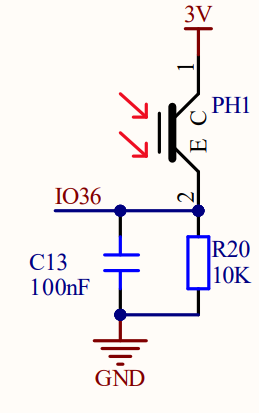
Photoresistor takes advantage of the photoelectric effect of semiconductors. Its resistance varies with ambient light.
In the light, the semiconductor material absorbs photon energy to produce electron-hole pairs, increasing the conductivity and reducing the resistance. The brighter the light is, the lower the resistance will be. From the changes of resistance, it can sense light intensity accurately. Therefore, it is widely used in automatic lighting, photoelectric control, real-time monitoring and regulation of light.
3.5.3 Code Blocks

This block reads the analog value of the photoresistor.
3.5.4 Test Code
3.5.4.1 Build Code
There are two ways to upload the code: directly open the code file we provide; or manually build blocks.
Directly open the code file we provide:
Click
 and choose
 Load from your computer
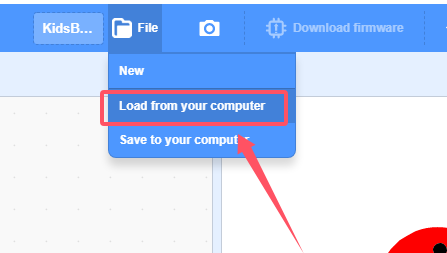
We have already downloaded the codes on computer desktop, so open the file and choose
3-5-light.sb3
Manually build blocks:
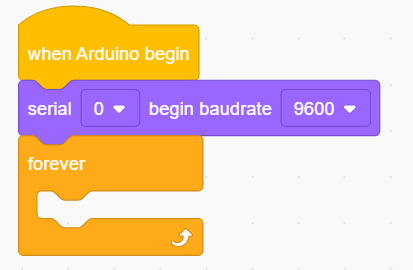
In
 , find
  block.
In
 , find
  block and set baud rate to 9600, and put it under .
In
 , put
, put  under
under  .
.
In
, drag block  into
into In
 , find block into the print box of
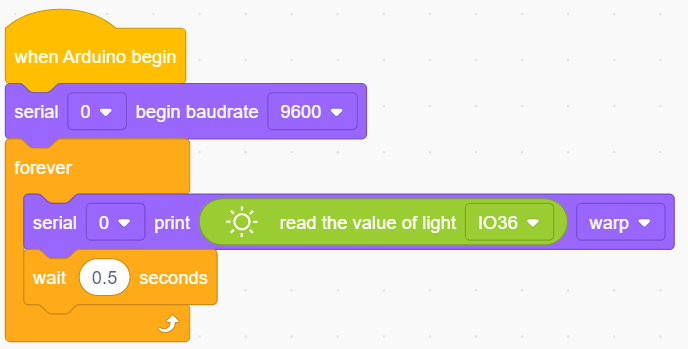
 At last, add a delay of 0.5s for better observing the results.
Complete Test Code
3.5.4.2 Test Result
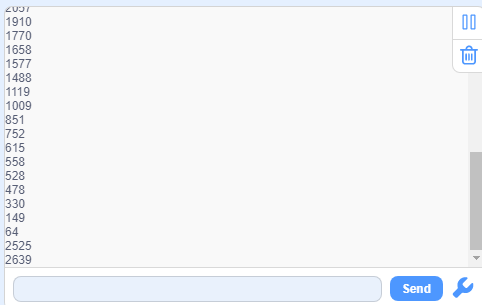
After uploading code, the serial monitor will print the analog value of the photoresistor. Cover the sensor with your hand, and you will see the value decreases. (Note that click  to set the baud rate before uploading code to avoid garbled words.)