3.35 WiFi Real-time Display
3.35.1 Overview
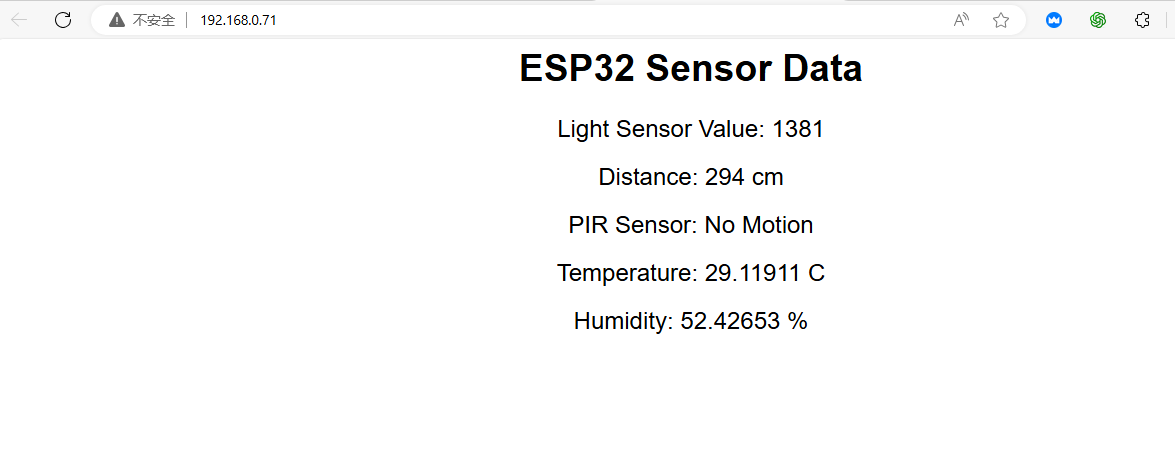
In this project, we display the values of temperature and humidity sensor, pressure sensor, photoresistor, sound sensor, PIR motion sensor and ultrasonic sensor on the web page.
3.35.2 Test Code
In Files, open 3-35-wifiWebpageDisplay.py and click  .
.
Code:
'''
 * Filename    : 3-35-wifiWebpageDisplay
 * Thonny      : Thonny 4.1.4
 * Auther      : http//www.keyestudio.com
'''
import network
import socket
import time
import json
import machine
from machine import Pin, ADC, I2C,SoftI2C,PWM
import aht20

# WiFi connection information
# SSID = 'your WiFi name'  # your WiFi name
# PASSWORD = 'your WiFi password'  # your WiFi password
SSID = 'ChinaNet_2.4G'  # your WiFi name
PASSWORD = 'ChinaNet@233'  # your WiFi password

# initialize sensor
# photoresistor
light_sensor = ADC(Pin(36))
light_sensor.atten(ADC.ATTN_11DB)

# ultrasonic sensor
# define the control pins of ultrasonic sensor
Trig = Pin(5, Pin.OUT)
Echo = Pin(4, Pin.IN)

distance = 0 # set initial distance value to 0
soundVelocity = 340 #Set the speed of sound.

# PIR sensor
pir_sensor = Pin(19, Pin.IN)

# AHT20 sensor
i2c = SoftI2C(scl=Pin(22), sda=Pin(21))
aht20Sensor = aht20.AHT20(i2c)

def getDistance():
    # maintain Trig pin at high for 10us to enable ultrasonic sensor
    Trig.value(1)
    time.sleep_us(10)
    Trig.value(0)
    #Start timing, the initial time of ultrasonic propagation in the air
    while Echo.value() == 0:
        Start = time.ticks_us()
    #The time of receiving the reflected ultrasonic wave
    while Echo.value() == 1:
        Stop = time.ticks_us()
    #The received time minus the initial time is the total time
    Time = time.ticks_diff(Stop,Start)
    #Calculate the distance according to the formula gives the result in meters.
    #Divide by 1000 to convert to centimeters.
    distance =  Time * soundVelocity //2 // 10000
    #return the calculated result
    return distance

# connect to WiFi
def connect_wifi(ssid, password):
    wlan = network.WLAN(network.STA_IF)  # Create WLAN objects using STA mode (client mode)
    wlan.active(True)  # activate WLAN interface
    wlan.connect(ssid, password)  # Connect to the specified WiFi network

    timeout = 10  # Connect timeout duration, in seconds
    while not wlan.isconnected() and timeout > 0:  # If the connection fails and the timeout period does not expire, check the connection status again
        print("Connecting to WiFi...")
        time.sleep(1)
        timeout -= 1

    if not wlan.isconnected():  # If the connection is not successful after timeout, an exception is thrown
        raise Exception("Could not connect to WiFi")

    print('Network config:', wlan.ifconfig())  # Output network configuration (IP address, subnet mask, gateway, and DNS)
    print('Connected to WiFi, IP address:', wlan.ifconfig()[0])  # output the IP address of the successful connection
    return wlan

# create HTML page
def web_page():
    html = """<html>
    <head>
        <title>ESP32 Sensor Data</title>
        <style>
            body { font-family: Arial, sans-serif; text-align: center; }
            .sensor { font-size: 24px; margin-top: 20px; }
        </style>
        <script>
            function updateData() {
                fetch('/sensor_data').then(function(response) {
                    return response.json();
                }).then(function(data) {
                    document.getElementById('light').innerText = data.light;
                    document.getElementById('distance').innerText = data.distance;
                    document.getElementById('pir').innerText = data.pir ? "Motion Detected" : "No Motion";
                    document.getElementById('temperature').innerText = data.temperature;
                    document.getElementById('humidity').innerText = data.humidity;
                });
            }
            setInterval(updateData, 1000);
        </script>
    </head>
    <body>
        <h1>ESP32 Sensor Data</h1>
        <div class="sensor">Light Sensor Value: <span id="light"></span></div>
        <div class="sensor">Distance: <span id="distance"></span> cm</div>
        <div class="sensor">PIR Sensor: <span id="pir"></span></div>
        <div class="sensor">Temperature: <span id="temperature"></span> C</div>
        <div class="sensor">Humidity: <span id="humidity"></span> %</div>
    </body>
    </html>"""
    return html  # Return the HTML page that contains the sensor data

# Start the Web server
def start_server():
    wlan = connect_wifi(SSID, PASSWORD)  # Connect to WiFi
    addr = socket.getaddrinfo('0.0.0.0', 80)[0][-1]  # Obtain the local IP address and port 80
    s = socket.socket()  # Create a socket object
    s.bind(addr)  # Bind sockets to addresses and ports
    s.listen(5)  # Start listening for incoming connections. The maximum number of connections is 5
    print('Listening on', addr)  # Print the address and port on which the server is listening

    while True:
        cl, addr = s.accept()  # Accept a client connection
        print('Client connected from', addr)  # Print the address of the client
        request = cl.recv(1024)  # Receive client requests, up to 1024 bytes
        request = str(request)  # Convert the request to a string
        print('Content = %s' % request)  # Print request content

        if 'GET /sensor_data' in request:
            light_value = light_sensor.read()
            distance = getDistance()
            pir_value = pir_sensor.value()
            temperature, humidity = aht20Sensor.read_temperature_humidity()

            sensor_data = {
                'light': light_value,
                'distance': distance,
                'pir': pir_value,
                'temperature': temperature,
                'humidity': humidity
            }

            response = 'HTTP/1.1 200 OK\nContent-Type: application/json\n\n'
            response += json.dumps(sensor_data)
            cl.send(response)
        else:
            response = web_page()
            cl.send('HTTP/1.1 200 OK\n')
            cl.send('Content-Type: text/html\n')
            cl.send('Connection: close\n\n')
            cl.sendall(response)
        cl.close()

# Run server
try:
    start_server()  # Try starting the Web server
except Exception as e:
    print('Failed to start server:', e)  # If the startup fails, an error message is displayed
    machine.reset()  # Restart the device to try to reconnect
Result:
Upload the code, and the Shell shows the IP address after connecting to wifi.
Connect your computer/mobile phone and ESP32 to the same wifi, and you can access the IP address to see the values through your device.
If you are using a mobile phone hotspot, you can directly access the IP via the phone.