3.17 Traffic Light
3.17.1 Overview
The traffic light module limits the pedestrian and vehicular thoroughfare. It includes a red, a yellow and a green light, which imply different instructions.
Red for Stop: Pedestrians and vehicles stop proceeding.
Yellow for Caution: Pedestrians and vehicles are ready for stopping. If the drive is already in process, the speed should be slow.
Green for Proceed: Pedestrians and vehicles keep going with the abidance of traffic regulations.
In this project, you can program on ESP32 Coding Boxto control a mini traffic light. For instance, set the duration of each lights and the interval time among them. Besides, you may also add a timer to alter light colors to schedule.
3.17.2 Test Code
Code Flow:
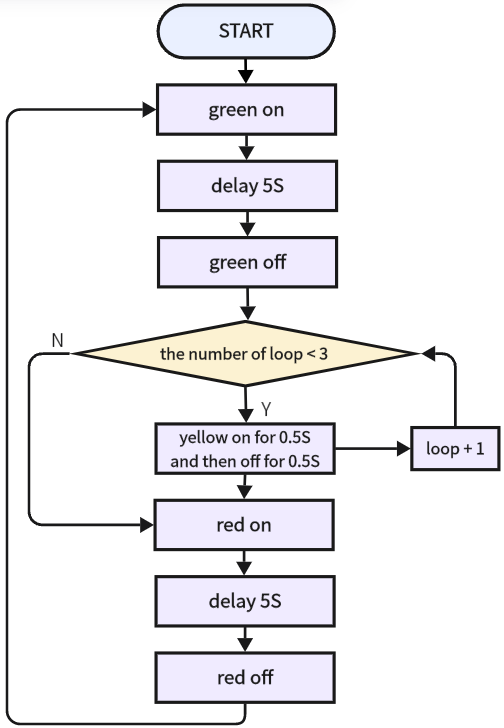
Code:
In Files, open 3-17-trafficLight.py and click  .
.
'''
 * Filename    : 3-17-trafficLight
 * Thonny      : Thonny 4.1.4
 * Auther      : http//www.keyestudio.com
'''
from machine import Pin
import time

redLED = Pin(23,Pin.OUT)	#set red LED to IO23
greenLED = Pin(27,Pin.OUT)	#set green LED to IO27
yellowLED = Pin(26,Pin.OUT)	#set yellow LED to IO26

#turn off three led
redLED.off()
greenLED.off()
yellowLED.off()

#green led on for 5S; yellow led blink for 3; red led on for 5S; in a loop
while True:
    greenLED.on()
    time.sleep(5)
    greenLED.off()
    for i in range(0,3):
        yellowLED.on()
        time.sleep(0.5)
        yellowLED.off()
        time.sleep(0.5)
    redLED.on()
    time.sleep(5)
    redLED.off()
Result:
After uploading code, the green LED lights up for 5s and goes off. Immediately, the yellow LED blinks for three times. After that, the red LED lights up for 5s and goes off. These actions are exactly a model of traffic light and will repeat.