3.15 WS2818 RGB LED
3.15.1 Overview
WS2812 RGB LED is an external control LED integrating control circuit and light emitting circuit. It adopts single-line return-to-zero code communication, and supports 256 gray levels to display full-colors. The integrated chip inside each pixels efficiently stabilizes color output. So it is widely used in lighting, display and decoration.
3.15.2 Schematic Diagram
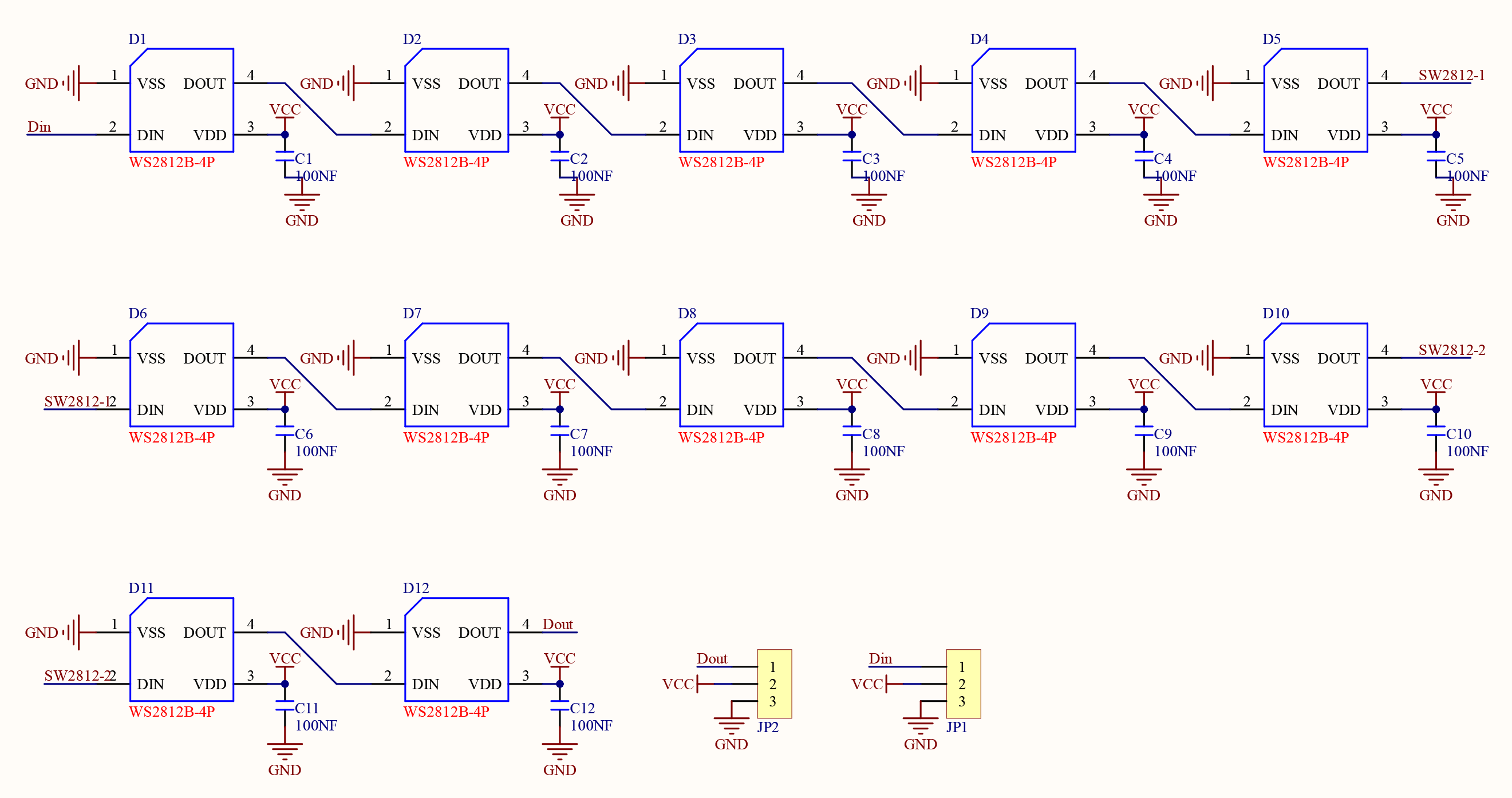
From the Schematic Diagram, ws2812 connects and transmits data over a single wire, which is the communication method named single-bus return-to-zero code (single NZR). The data enters in serial through the DIN port, and each pixel receives and processes 24 bits data (R, G, B color channels with 8 bits each).
For detailed information of transmission mode, please refer the specification of ws2812.
3.15.3 Test Code
In Files, open 3-15-rgbLed.py and click  .
.
Code:
'''
 * Filename    : 3-15-rgbLed
 * Thonny      : Thonny 4.1.4
 * Auther      : http//www.keyestudio.com
'''
#Import Pin, neopiexl and time modules.
from machine import Pin
import neopixel
import time

pin = Pin(16, Pin.OUT)	#define SK6812 control pin to IO16
num_pixels = 12			#set the number of SK6812 beads to 12
#initialize SK6812 beads
np = neopixel.NeoPixel(pin, num_pixels)

red = [255,0,0]	#set display color to red

while True:
    np[0] = red		#the first bead lights up in red. 12 beads: number from 0-11
    np.write()		#refresh to display the set color
Result:
After uploading code, the first bead of ws2812 module will light up in red.
3.15.4 Extension
Light up all LED circulating red, green, and blue.
In Files, open 3-15-rgbLed2.py and click .
Code:
'''
 * Filename    : 3-15-rgbLed2
 * Thonny      : Thonny 4.1.4
 * Auther      : http//www.keyestudio.com
 ----------------------------------------
    color = [red,green,blue]
    color stores the color values.
    red.green,blue corespond to RGB values, ranging from 0-255
    Red [255,0,0]
    set the color you want to display according to RGB color table
'''
#Import Pin, neopiexl and time modules.
from machine import Pin
import neopixel
import time

pin = Pin(16, Pin.OUT)	#define SK6812 control pin to IO16
num_pixels = 12			#set SK6812 beads to 12
#initialize SK6812
np = neopixel.NeoPixel(pin, num_pixels)
red = [255,0,0]	#red
green = [0,255,0]#green
blue = [0,0,255]	#blue

while True:
    for i in range(num_pixels):		#for loop: add i from 0 to 11
        np[i] = red		#show red at i
        np.write()		#refresh to display the set color
        time.sleep_ms(50)	#delay 50ms to change the color of the ring gradually
    time.sleep(1)	#Pause 1 second after all display
    for i in range(num_pixels):
        np[i] = green		#show green at i
        np.write()
        time.sleep_ms(50)
    time.sleep(1)
    for i in range(num_pixels):
        np[i] = blue		#show blue at i
        np.write()
        time.sleep_ms(50)
    time.sleep(1)
Result:
After uploading code, ws2812 repeatedly lights up in red, green and blue with 1s each color.