3.33 Compass
3.33.1 Overview
The AK8975 module is adopted to read direction values. According to these values, the OLED displays different arrows.
3.33.2 Test Code
Code Flow:
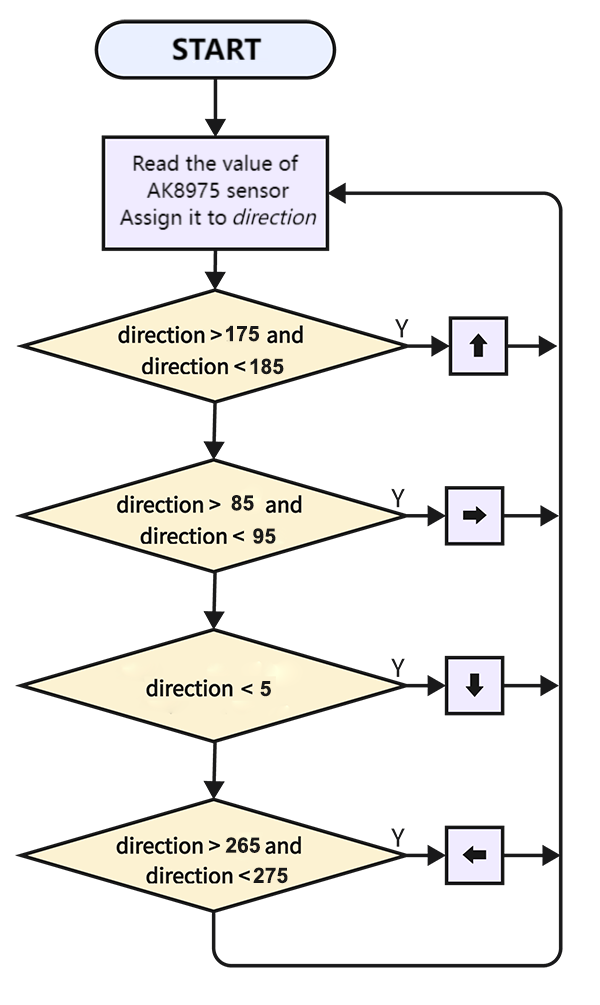
Code:
In Files, open 3-33-compass.py and click  .
.
'''
 * Filename    : 3-33-compass
 * Thonny      : Thonny 4.1.4
 * Auther      : http//www.keyestudio.com
-----------------------------------------
The relationship between direction and Angle:
    0° : Due north
    90° : Due east
    180° : Due south
    270° : Due west
'''
import machine
import time
from machine import Pin
#import ak8975c from AK8975C library
from AK8975C import ak8975c
from oled import OLED

scl = Pin(22)
sda = Pin(21)
# initialize I2C interface
i2c = machine.SoftI2C(scl, sda)
# create OLED example
oled = OLED(i2c)
#create ak8975c object, initialize I2C bus number and SCL and SDA pins
Triaxial = ak8975c(scl, sda)

while True:
    Triaxial.measure()  # measure the value
    if Triaxial.AK8975_GET_AZIMUTH(Triaxial.X, Triaxial.Y) == True:  # Print the value of the course Angle only if the Angle can be calculated
        direction = Triaxial.angle_val
        print('degree:', direction,'°')
        # clear display
    oled.clear()
    if	direction >= 175 and direction <= 185:	#determine the direction by the Angle value
        oled.show_arrow_up()			#up arrow
    elif direction >= 265 and direction <= 275:
        oled.show_arrow_left()			#left arrow
    elif  direction <= 5:
        oled.show_arrow_down()			#down arrow
    elif direction >= 85 and direction <= 95:
        oled.show_arrow_right()			#right arrow
    oled.oled.show()
    time.sleep(0.3)
Result:
After uploading code, the arrow on the OLED will nearly point to the South. Move the coding box and you will see the direction changes.