3.23 Human Body Piano
3.23.1 Overview
The analog piano mainly includes an ultrasonic sensor to detect the distance of your position. It plays different tones according to distance values. If there is an open space, you may place it on ground to play musics.
3.23.2 Test Code
Code Flow:
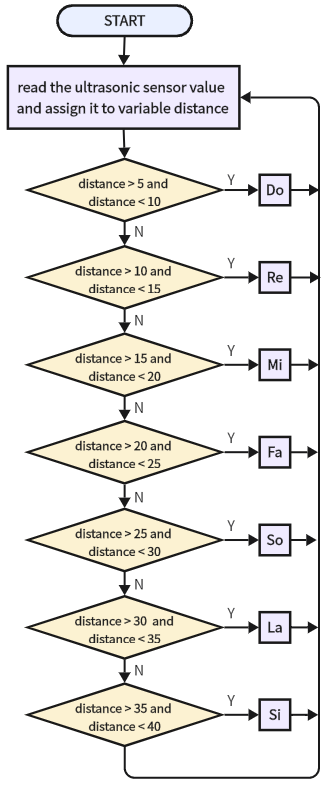
Code:
In Files, open 3-23-separatedPiano.py, and click  .
.
'''
 * Filename    : 3-23-separatedPiano
 * Thonny      : Thonny 4.1.4
 * Author      : http://www.keyestudio.com
'''

from machine import Pin, PWM
import time

# set PWM output pin to IO32, frequency to 5000 Hz, duty cycle to 0
trumpet = PWM(Pin(32), freq=5000, duty=0)

# define an array to store frequency
a = [523, 587, 659, 698, 784, 880, 988]

# set the control pins of ultrasonic sensor
Trig = Pin(5, Pin.OUT)
Echo = Pin(4, Pin.IN)

distance = 0  # initial distance value = 0
soundVelocity = 340  # sound velocity = 340 m/s

def getDistance():
    """
    enable the ultrasonic sensor to detect the distance
    :return: detected distance(unit:cm)
    """
    # maintain Trig pin at high for 10us to enable the ultrasonic sensor
    Trig.value(1)
    time.sleep_us(10)
    Trig.value(0)

    # wait Echo pin to high, record the starting time
    while Echo.value() == 0:
        Start = time.ticks_us()

    # wait Echo pin to low, record the ending time
    while Echo.value() == 1:
        Stop = time.ticks_us()

    # calculate Echo pin high level time
    Time = time.ticks_diff(Stop, Start)
    # calculate the distance according to time, unit: cm
    distanceVal = Time * soundVelocity // 2 // 10000
    return distanceVal

def play_tone(index):
    """
    Play the specified scale
    :param index: Scale index
    """
    trumpet.duty(10)  # control PWM duty cycle(0-255) to adjust the sound volume
    trumpet.freq(a[index])  # set PWM frequency to correspond to tone frequency
    time.sleep_ms(300)  # play tone for 300ms
    trumpet.duty(0)  # stop tone

while True:
    distance = getDistance()  # attain distance value
    # play corresponding tone according to the detected distance
    if 5 < distance < 10:
        print("Do")
        play_tone(0)
    elif 10 < distance < 15:
        print("Re")
        play_tone(1)
    elif 15 < distance < 20:
        print("Mi")
        play_tone(2)
    elif 20 < distance < 25:
        print("Fa")
        play_tone(3)
    elif 25 < distance < 30:
        print("So")
        play_tone(4)
    elif 30 < distance < 35:
        print("La")
        play_tone(5)
    elif 35 < distance < 40:
        print("Si")
        play_tone(6)

    time.sleep_ms(100)  # delay 1s after each measurement
Result:
After uploading code, put your hand in front of the ultrasonic sensor and the speaker will emit sound. You can control the tone by moving your hand in front of the sensor.