3.10 Temperature and Humidity Sensor
3.10.1 Overview
AHT20 temperature and humidity sensor adopts I2C interface and 20Bit ADC, and its operating voltage is 2V-5V. It features small volume, stable performance and high precision (temperature ±0.3℃, humidity ±2%RH). So it is widely used in smart home, consumer electronics, medical and automotive. The sensor is stable and can work in harsh environments.
3.10.2 Schematic Diagram
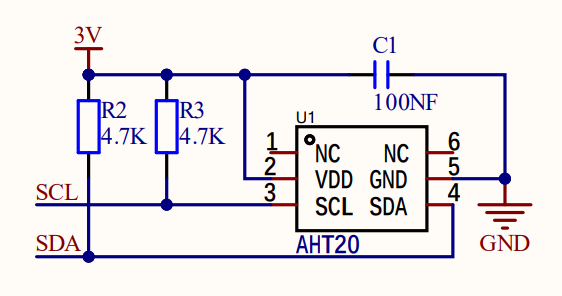
ATH20 temperature and humidity sensor transmits data via I2C interface, and it works according to resistive and capacitive technology. It detects the temperature because the material’s conductivity changes with temperature, and it reflects humidity through the change in the capacitance value. The temperature measurement range is -40 ° C to +85 ° C with accuracy of ±0.3 ° C, and the humidity range is 0% ~ 100%RH ±2%RH. Besides, it features high accuracy, high reliability and long-term stability, so it can work under a variety of environmental conditions. With I2C protocol, ATH20 provides real-time and accurate temperature and humidity data.
3.10.3 Code Blocks
Blocks in  :
:
 is a block included in coding box library. It reads the ambient temperature sensed by the coding box.
 is a block included in coding box library. It reads the ambient humidity sensed by the coding box.
3.10.4 Test Code
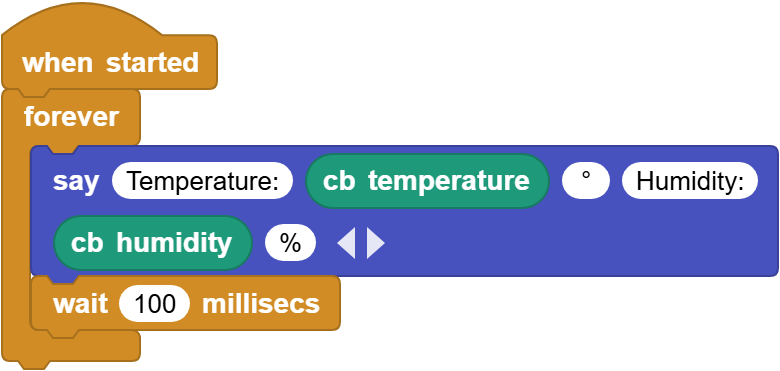
You can manually build blocks, or directly open the code file we provide: 3-10-AHT20.ubp. If you have any questions about how to open code files or upload code, please back to 1.9 Upload Code.
Build code blocks:
In
 , drag
  and
and  to the script area, and stack them together.

In
 , drag
  block and place in .
Click
 of the to set 6 outputs blanks in total. In the first blank, enter
 Temperature:; in the fourth one, enterHumidity:. Output “°” and “%” as their units respectively.

In
, drag and put it onto the second blank of .In
, drag and put it onto the fifth blank of .In
, drag  and put it under the and set the delay to
 100ms.
Complete code:
3.10.5 Test Result
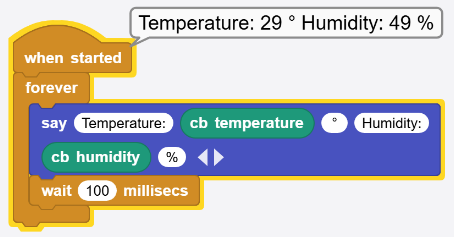
Connect the coding box to the MicroBlocks via USB or Bluetooth, and click  to upload the code to the coding box. You will see the temperature and humidity values. If you cover the sensing hole of the sensor with your hand, you can see a significant change in humidity.